Rate it. Say it. Snap it. Praxis writes the report — in your words, nothing added.

Every component gets a rating, your voice note and its photos. You check every line, edit anything, and send when it’s right.

We’ll only use your name and email to contact you about the Praxis beta. No sharing, no selling. Ask us to remove you anytime at [email protected].

  1. Rate itGood, Fair, Poor or N/A
  2. Say what you seeOne tap records a voice note
  3. Snap the photoTagged to the component
  4. Praxis writes itYour words, as a report finding
Sample data

How it works

Seen. Written. Delivered.

Three steps, one job. You stay the professional of record from the first room to the client’s inbox. These are the app’s real screens.

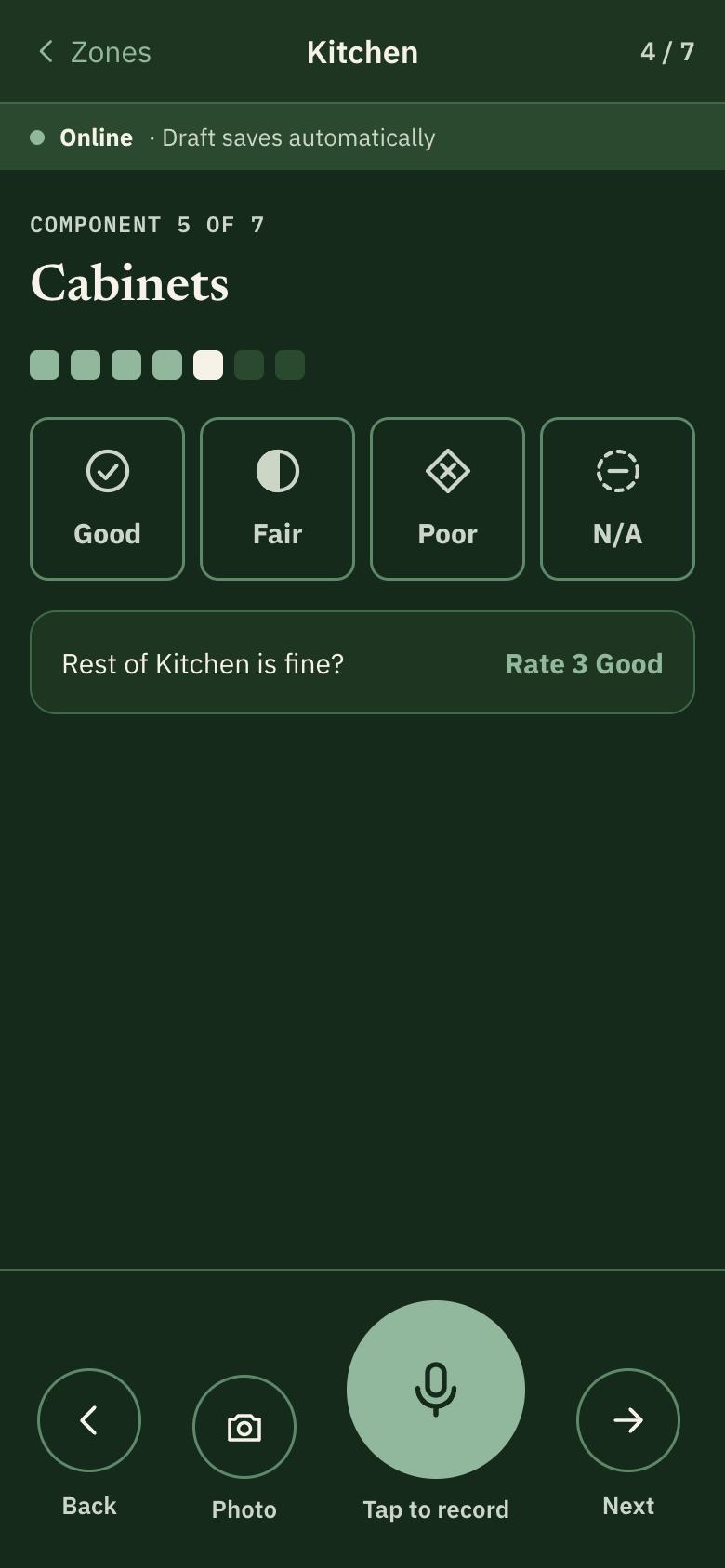
  1. Praxis capture screen: rate a component Good, Fair, Poor or N/A, with Photo and Tap to record buttons

    Seen

    Walk room by room. Rate each component, take photos, and say what you see. Works without a signal.

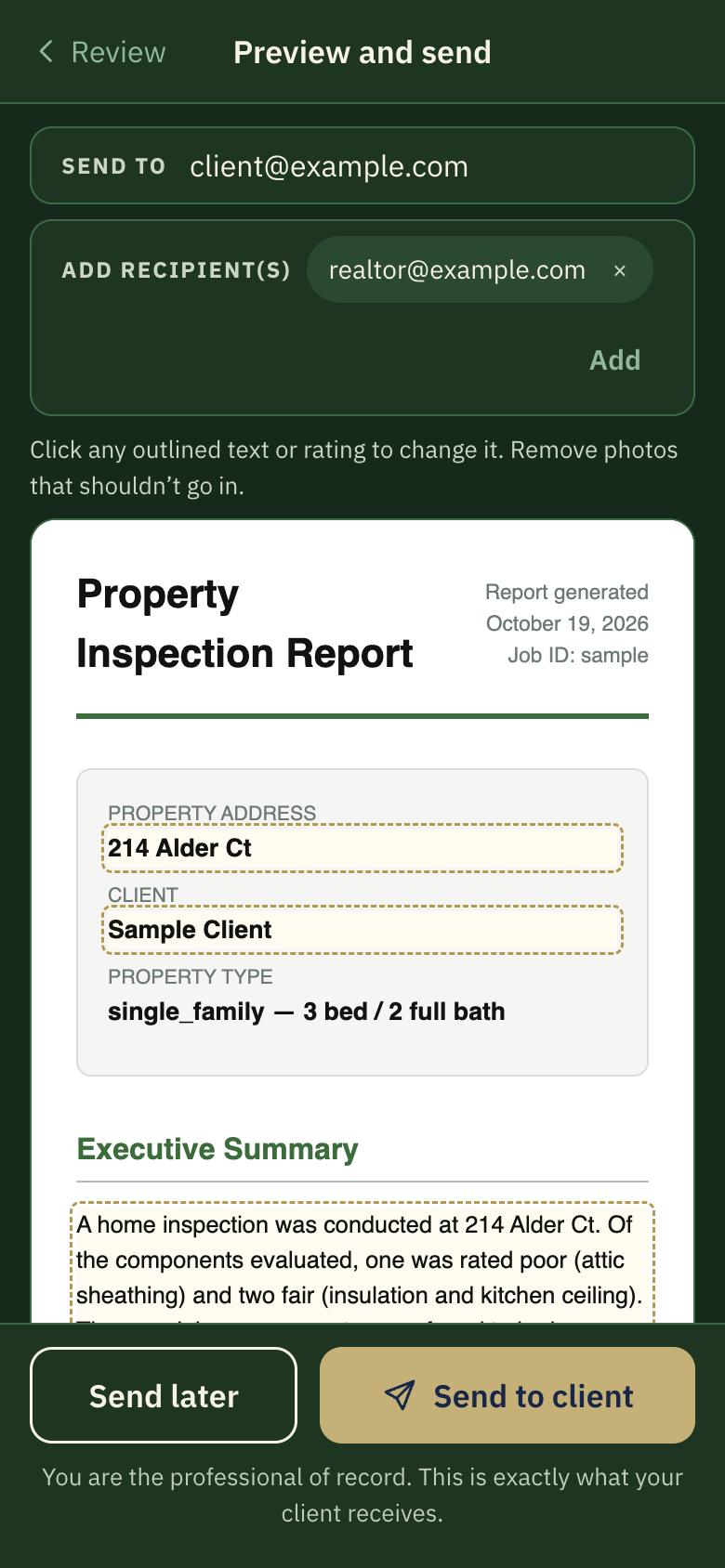
  2. Praxis preview: the formatted report with editable findings

    Written

    Praxis drafts each finding from your voice note. Preview the formatted report and change any word, rating or photo.

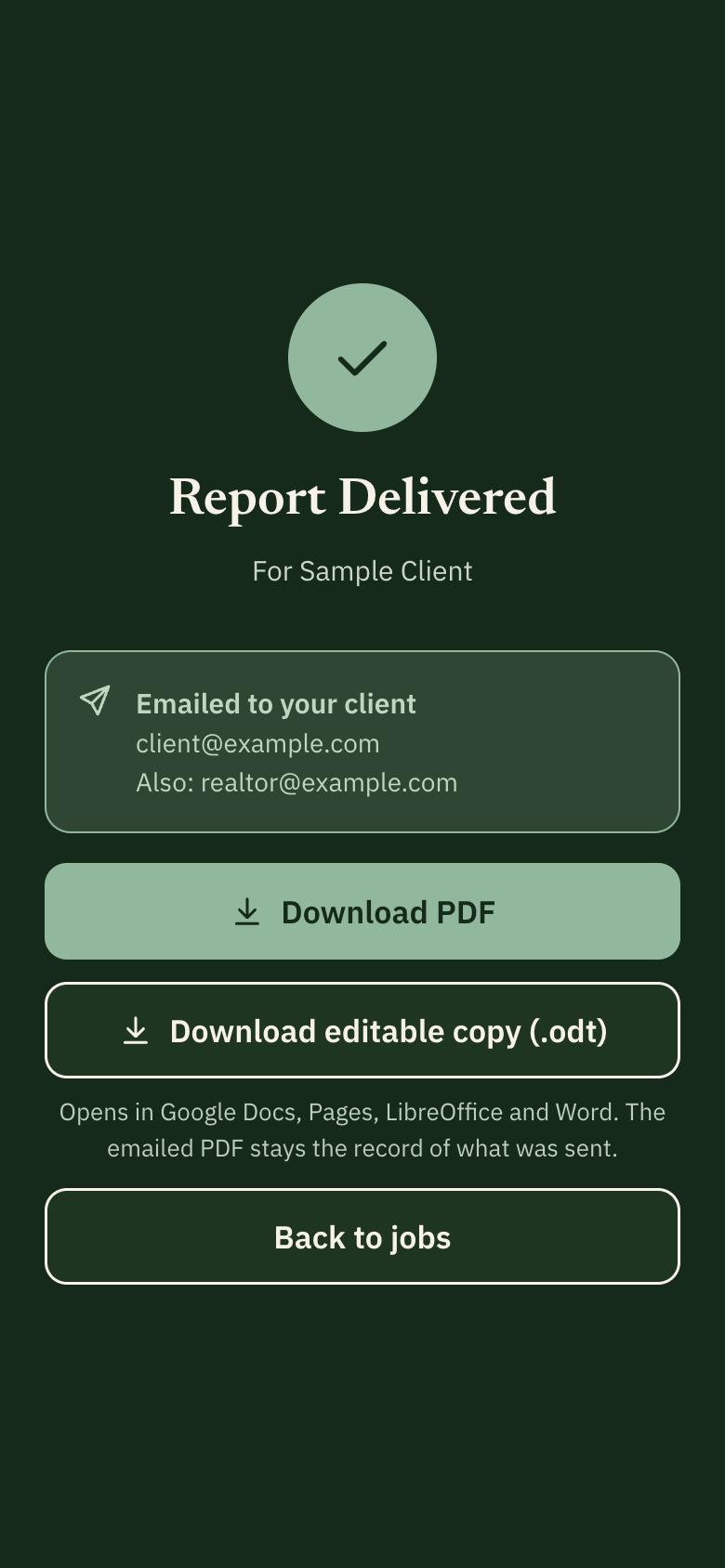
  3. Praxis delivered screen with PDF and editable copy downloads

    Delivered

    Send now or schedule it. Your client gets the PDF; you keep a PDF and an editable copy.

One finding

One component. Everything attached.

In Praxis, a finding is more than a paragraph. Each one carries its rating, your voice, its photos, who inspected it and every change made to it — and soon its video and code reference.

1
Attic · SheathingPoor
2

“The attic sheathing has deteriorated to the point of disintegration and is in need of replacement. Evaluation by a qualified contractor is recommended to determine the full extent of the condition and the repair or replacement required.”

Written from a 6-second voice note

3
4

Inspected by A. Morgan

5

Rating Fair → Poor · edited by A. Morgan, Oct 12, 4:18 PM PDT

6
30-second video clip · in development
No people in frame, ever.
7
Code reference · in development
For example, a double-tapped breaker would show California Electrical Code 110.14(A).
  1. 1
    Rating Live

    Good, Fair, Poor or N/A, one tap per component. Poor and Fair stand out in the report.

  2. 2
    Your voice, written up Live

    Talk through what you see. Praxis turns it into report wording without adding causes, hazards or reassurances you didn’t give.

  3. 3
    Photos on the component Live

    Each photo is tagged to the component it shows and lands next to that finding in the report.

  4. 4
    Who inspected it Live

    On a shared job, every rating, photo and voice note carries the name of the inspector who did it.

  5. 5
    Edit trail Live

    Every change keeps the original, who changed it and when, in the inspector’s time zone.

  6. 6
    Video clips In development

    Short clips for what a photo can’t show. Occupied homes and people stay out of frame.

  7. 7
    Code reference In development

    A reference to the relevant code section, attached to the observation for your review — not a ruling on compliance.

Sample finding. The wording is from a real beta inspection; the name, date and photos are illustrations.

Why inspectors switch

Your words in, your words out.

Praxis writes only what you reported. No causes you didn’t name, no hazards you didn’t call, no reassurances you didn’t give.

What the inspector said

“The sheathing has disintegrated over time and needs to be replaced.”

What the report says

“The attic sheathing has deteriorated to the point of disintegration and is in need of replacement. Evaluation by a qualified contractor is recommended to determine the full extent of the condition and the repair or replacement required.”

From a real beta inspection. A rating with no voice note gets plain wording: “Specific observations were not recorded.”

  • Edit the actual report

    Preview the exact PDF your client gets. Change any word, rating or photo right on the page.

  • Every change on record

    The original text, who changed it and when. Photos you remove are kept with the job, never deleted.

  • Several inspectors, one house

    Share a job and split the rooms. Each person’s part stays tied to them, and the report shows who inspected what.

  • Works without a signal

    Basements and crawlspaces don’t stop you. Ratings, voice notes and photos save on the phone and send when you’re back online.

  • Every report, findable

    Search every report you’ve sent by address, client or wording, and copy language you’ve used before.

  • Send now, or later

    Send when it’s right or schedule it, to the client and anyone else they want copied. Keep an editable copy.
Building next

What’s coming to Praxis.

In development now. Beta inspectors help decide what ships first.

  • Video clipsThirty seconds for what a photo can’t show, with people always out of frame.
  • Code referencesThe relevant code section attached to an observation, for you to review.
  • TranslationCapture in your language; deliver the report in your client’s.
  • Face ID and fingerprintSign in with your phone’s lock instead of a code.

Our promise

Your report. Your call.

  • Nothing reaches a client until you send it.You review every finding and approve the final report yourself.
  • No people, no personal information.Occupants, papers, mail and screens stay out of photos. Praxis reminds you every time the camera opens.
  • Your evidence is kept.Photos removed from a report are never deleted; they stay with the job.

Be one of the first inspectors on Praxis.

We’re opening Praxis to a small group of home inspectors first. Tell us where you work and we’ll be in touch.

Join the beta